Five criteria decide which supplier you should trust: proven factory-display integration, verified ai thermal camera performance, regulatory compliance, transparent total cost, and reliable after-sales support. Treat this purchase as a system-integration decision, not a camera-spec shopping exercise. A thermal night vision system only earns its value when it works with the vehicle display already in the cabin. The wrong match adds hardware, labor, and support burden. This guide gives you a step-by-step comparison method and a practical scorecard. You will learn how to test automotive suppliers against your own host configurations, weigh installation economics, and convert pilot results into a clear choose-or-wait decision for your car night vision system program.
Key Takeaways
Pick a supplier based on how well it has worked with your factory display, not just on camera specs.
Check how well the AI thermal camera works by using real video and detection range data for your vehicles.
Check certifications, warranty, and steady supply to make sure everything meets the rules and works reliably.
Compare the total cost of ownership, including installation and support, not just the unit price.
Run a pilot test on typical vehicles first. This checks that everything works well together before you make a final commitment.
Define Thermal Night Vision System Requirements
Factory Display Or Dedicated Screen
You have two ways to connect things. An original-screen setup sends the thermal image to a wired CarPlay screen, an Android head unit, or a supported factory screen. It often does this through an AI box. This way works well for display brands and retrofit businesses that want to reuse the screen already in the cabin. A video-output setup sends AHD, HDMI, or CVBS to a dedicated monitor. That way fits fleets and workshops that prefer a self-contained unit.
Your product-type choice shapes what you need from a supplier. An automotive thermal camera module or core supports deeper integration into a factory thermal system. A complete thermal night vision system arrives ready to install. Modules need more engineering support and clearer interface documentation. Complete units need stronger installation guides and spare-parts coverage.
Vehicle Models And Operating Conditions
Write down your targets before you compare quotes. Record each vehicle model and head unit, the driving environments you serve (dark rural roads, fog, rain, cold weather), the recognition distance you need, and whether recording or warning alerts matter. Note mounting location, environmental protection, video interfaces, and latency for every configuration. These details let a supplier confirm fit instead of guessing.
Scale matters here. One automotive supplier reported its thermal cameras integrated into more than 20 vehicle models through partnerships with over 15 OEMs. That volume shows how many host configurations a mature factory thermal display program must cover. Treat universal compatibility as unproven until a pilot confirms it on your own vehicles. A car night vision system that works on one head unit may fail on the next, so list every host model and screen type in your requirement brief.
Evaluate AI Thermal Camera Performance
Thermal Imaging And Detection Range
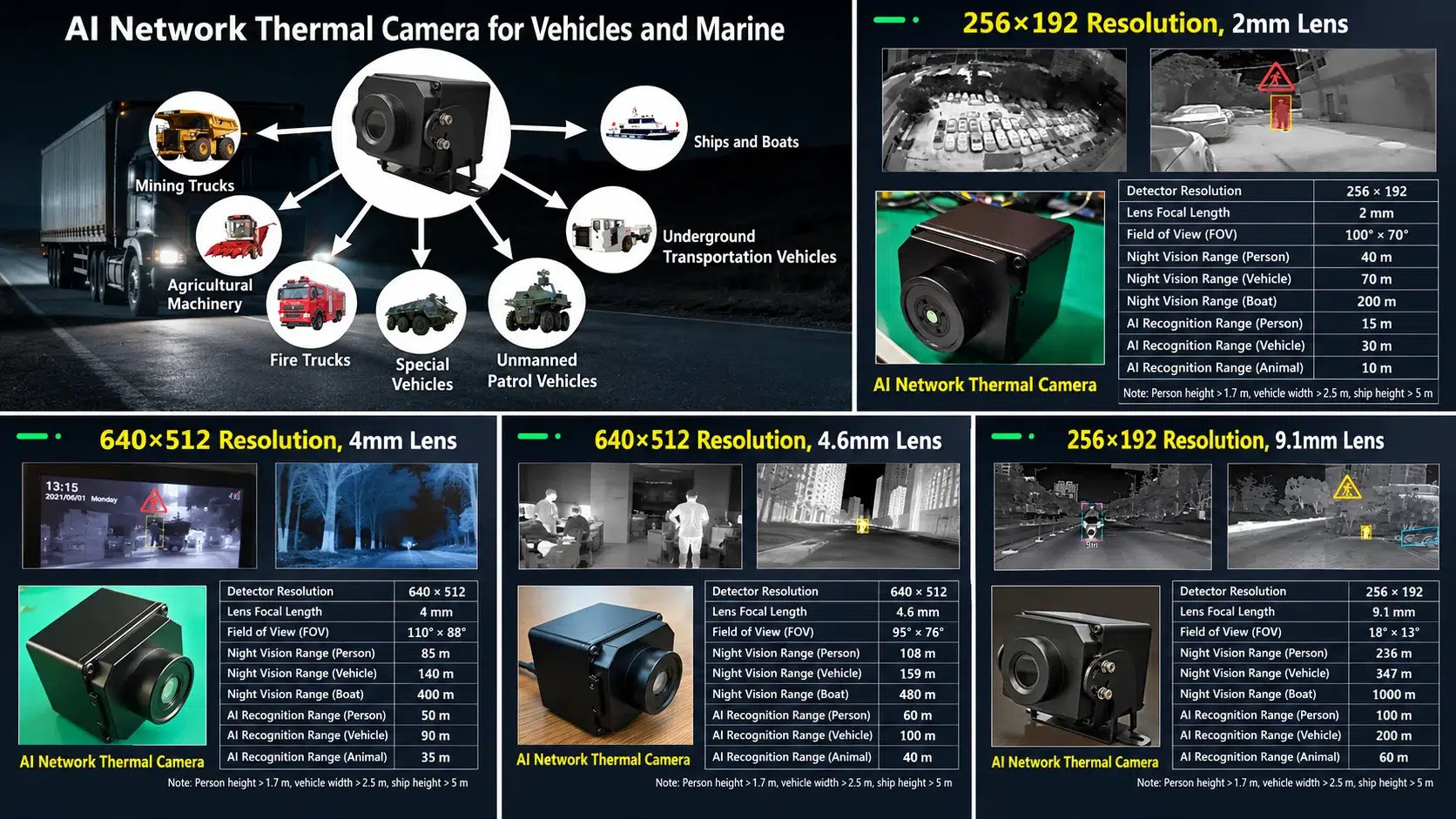
Sensor resolution is the base for every performance claim a supplier makes. Long-wave infrared (LWIR) options often start at 256 x 192 and go up through 384 x 288 to 640 x 512. A higher-resolution core picks up smaller temperature differences across a wider scene. That matters when you need to spot a person far away on an unlit road. Lens choice and field of view then shape how that resolution reaches the road ahead. A narrow lens pushes recognition farther out, while a wide lens covers more lanes and roadside hazards closer in. Ask each supplier to map detector and display resolution against your required recognition distance for the specific vehicle model, not a generic demo clip.
Published figures show how wide the spread can be. One model, the AC-972(TIC), lists a 200m detection range and a 100m AI recognition range. The CV2 lists 100m for pedestrians and 200m for vehicles. A Pilot Automotive Thermal Camera reaches up to 208m. Treat these as starting references, then confirm them on your own routes. An ai thermal camera that performs well on paper may act differently once mounted behind a windshield.
AI Recognition Scope And Output
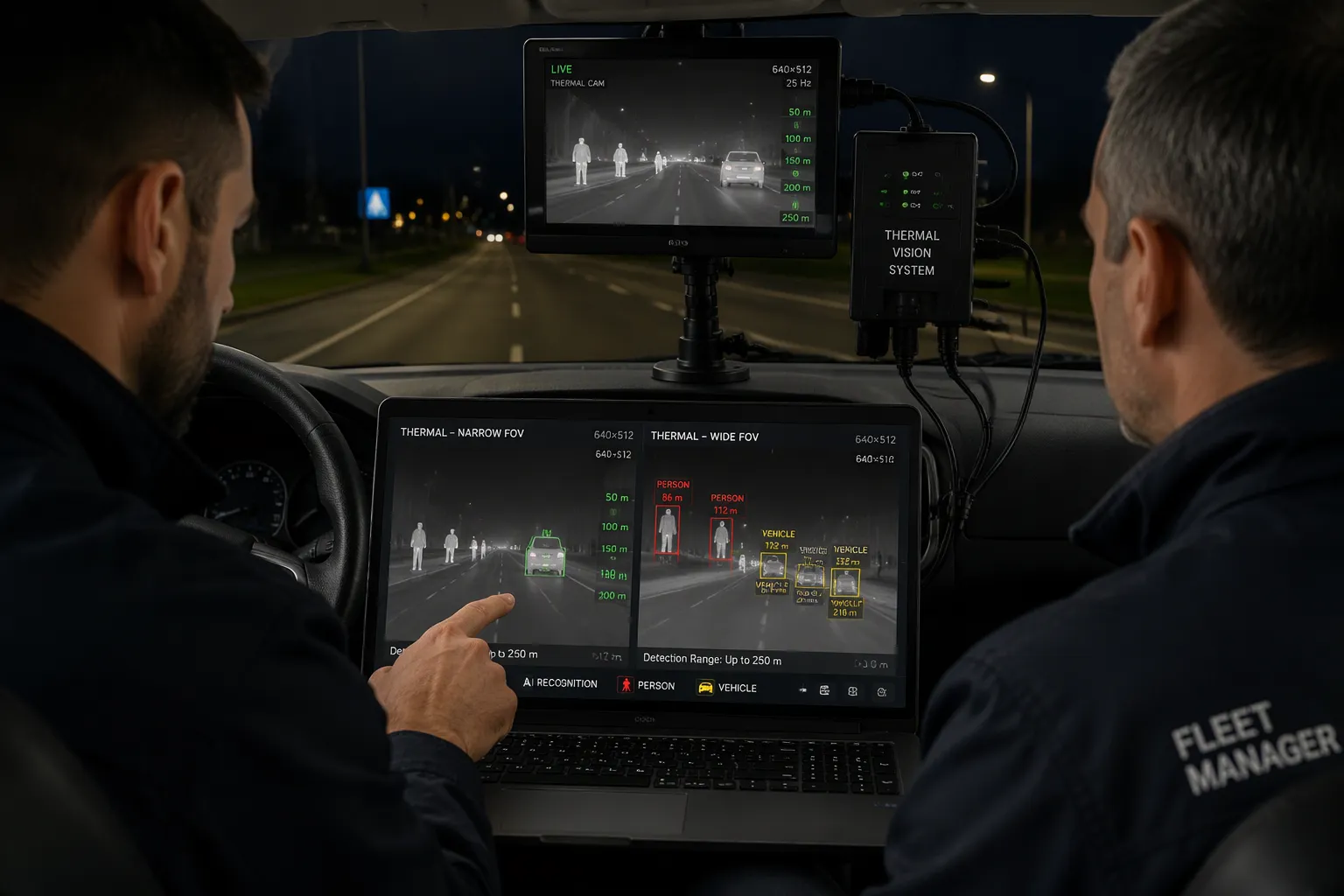
Recognition features can differ by host configuration, so you should assess each path separately. In original-display setups, the ai-based object detection may recognize people and vehicles while animals stay visible in the thermal image without an AI label. That is still useful for a driver scanning a dark rural road. Dedicated-display configurations deserve their own evaluation, because the processing path and output differ. Ask the supplier to state plainly which target classes each configuration supports, and compare target classification results side by side before you commit.
Request sample footage from real night drives, detection-range data tied to each resolution and lens option, and a demonstration of warning-zone configurability. Confirm durability too: an IP6K9K enclosure and heated-window support matter for cold-weather fleets. For temperature-measurement programs, ask about a bi-spectrum ai radiometry thermal camera. The thermal imaging and ai-based object detection technology behind an ai-powered night vision system only proves itself through footage you can review, so build that review into your supplier comparison. A capable automotive ai night vision system should also document how ai-based accurate object detection behaves across your head units, and how the display renders alerts for the driver.
Verify Automotive Thermal Camera Integration And Compliance
Video Output, Host Compatibility, And Installation
Check the exact video output before you ask for a price quote. An ai thermal camera may send CVBS or AHD signals, and some setups add HDMI. Match that output to the host model you picked and the vehicle display input. A mismatch here makes you add converters or replace hardware, and both raise your installation cost. Ask the supplier for a written compatibility statement for each head unit you plan to support. This step protects your profit and your schedule.
Ask for installation documents for every setup you plan to sell. Good documents cover wiring, mounting location, power needs, and display settings. Ask about spare parts for brackets, cables, and the camera module itself. A retrofit business cannot wait weeks for a replacement part. Confirm that the automotive thermal camera ships with the right connectors for your target vehicles.
Seamless integration depends on more than the camera. Ask how the system handles start-up video, logo display, and alert voice changes. These details shape the user experience your customers see every day. For fleet programs, ask whether the supplier supports vms compatibility or offers a video management software option for reviewing recorded footage. A factory thermal system that ignores these workflow questions creates support tickets later.
Certifications, Warranty, And Supply Continuity
Ask for the regulatory and market certifications that apply to your sales region. The supplier should give you certificates you can verify, not just a claim on a datasheet. Warranty terms deserve the same close look. Confirm the coverage period, what parts the warranty includes, and how the supplier handles claims across borders. A clear warranty process protects your reputation when a unit fails in the field.
Supply continuity matters for any manufacturing program. Ask about production capacity, lead times, and stock levels for your chosen setup. A supplier who cannot promise repeatable lead times will disrupt your installation schedule. Discuss OEM/ODM customization options early. Start-up video, logo, alert voice, and packaging changes all affect your brand presentation and your program timeline. The supplier should confirm which customization options apply to your order volume.
For advanced programs, ask about a bi-spectrum ai radiometry thermal camera for temperature-measurement use cases. This option extends the platform beyond night vision into industrial and specialty vehicle applications. Confirm that ai-based object detection performance stays consistent across every display setup you plan to offer. A supplier who documents this consistency gives you confidence for your retrofit channel and your head unit brand partners.
Compare AI Car Thermal Night Vision System Cost
Unit Price Versus Lifecycle Cost
A low unit price does not tell you much about what you will really spend. Build your comparison around the total cost of ownership. The table below shows the cost lines to collect from every supplier.
Cost Line | What to Capture |
|---|---|
Unit price | Camera, screen, and cables |
Host hardware | AI box or adapter needed per configuration |
Installation labor | Hours per vehicle model |
Training | Time for installers and sales staff |
Spare parts | Brackets, cables, camera modules |
Warranty service | Claim handling and shipping |
Retrofit support | Revisits across vehicle models |
Installation costs deserve extra attention. An original-screen setup reuses the display already in the cabin, so you skip the cost of new hardware and a second screen. A dedicated-monitor setup adds hardware, mounting work, and cabin space. Neither path is wrong, but each one has a different cost profile. Price both paths against your real host configurations before you commit.
Comparing Quotes Fairly
Quotes rarely come in the same shape. One supplier prices a 256 x 192 core with a wide lens and a dedicated screen. Another prices a 384 x 288 core with a narrow lens and an AI box for the factory display. Make every quote match the same resolution, lens, display type, and customization level before you compare. Ask each supplier to break the price into the cost lines above.
The lowest unit price often hides the highest lifecycle cost. A cheap camera that needs an adapter, extra labor, and frequent spare parts costs more over a fleet rollout. A higher-priced unit that plugs into the existing display and ships with full documentation usually wins on total spend. Run this math for every host configuration in your program, and let the ai car thermal night vision system quote that survives the full comparison earn your order. Your vehicle display partners will judge the result by the support burden it creates, so weigh retrofit support costs as heavily as the invoice price. A car night vision system that fits the first time protects your margin and your schedule.
Score Suppliers And Pilot Test
Scorecard Criteria And Weighting
Put your comparison into one scorecard. Give each supplier a score from 1 to 5 on six criteria, then apply a suggested weight to each one. Integration fit gets the highest weight, because a poor match with the factory display pushes every other cost up. Thermal and AI performance comes next, then compliance, cost, support and documentation, and supply continuity. Change the weights to fit your program, but keep integration fit at the top for display-reuse projects.
Criterion | Suggested Weight |
|---|---|
Integration fit | 25% |
Thermal and AI performance | 20% |
Compliance | 15% |
Cost | 15% |
Support and documentation | 15% |
Supply continuity | 10% |
Score the ai thermal camera on evidence, not promises. Ask for footage, compatibility statements, and certificates. A supplier who scores well on paper but cannot document claims should get a lower mark.
Pilot Testing Across Vehicle Models
Test representative head units before you expand a distribution program. Pick two or three vehicles that cover your main display types, then install the thermal night vision system on each one. Record installation time, image quality, alert behavior, and any adapter needs. Never assume universal compatibility. A setup that works on one head unit may fail on the next.
Run each pilot on dark rural roads, in fog, and in rain. Check how ai-based object detection labels people and vehicles at your required distance. Confirm the display shows alerts clearly in daylight and at night. Write down every issue with photos and notes.
This system is a driving aid. It does not control steering or braking, and the driver remains responsible for safe operation.
For temperature-measurement programs, ask about a bi-spectrum ai radiometry thermal camera. That option extends the platform into specialty automotive work. A second bi-spectrum ai radiometry thermal camera question worth asking: does it share the same mounting and video output as your standard unit? Strong pilot results support road safety claims you can defend.
Five things help you pick the right supplier: proven factory-display integration, verified AI thermal performance, regulatory compliance, clear total cost, and dependable after-sales support. Turn your scorecard and pilot results into one clear decision. Pick a supplier when integration fit scores high on your own head units, pilot footage confirms recognition at your required distance, and lifecycle cost stays predictable across every vehicle model. Wait when compatibility statements stay vague or pilots show you need adapters.
Then take one next step. Send your vehicle and head-unit details to a supplier like VERYTEK. Ask for a quote that matches your display type, resolution, and lens choice. A precise brief earns a precise quote, and that quote lets you compare suppliers on equal terms.
FAQ
Can I keep the factory screen instead of adding a second monitor?
Yes. An original-screen setup sends the thermal image to a wired CarPlay screen, an Android head unit, or a supported factory screen. It often does this through an AI box. This path reuses the display already in the cabin. You skip new hardware and a second screen, which lowers installation cost per vehicle.
Which thermal resolution should I order for my program?
Match resolution to your required recognition distance. A 256 x 192 core suits shorter-range urban routes. Step up to 384 x 288 or 640 x 512 when you need to spot people farther out on dark rural roads. Ask the supplier to map each option against your own routes before you commit.
Do AI recognition features differ between host configurations?
They can. In original-display setups, AI may recognize people and vehicles while animals stay visible in the thermal image without a label. Dedicated-display setups follow a different processing path. Evaluate each configuration separately and request footage from real night drives for both.
How do I compare quotes when configurations differ?
Make every quote match the same resolution, lens, display type, and customization level. Ask each supplier to break out unit price, host hardware, installation labor, training, spare parts, and warranty service. The lowest unit price often hides the highest lifecycle cost across a fleet rollout.
Why should I pilot test before expanding distribution?
Universal compatibility stays unproven until you test it. Pick two or three vehicles covering your main display types. Record installation time, image quality, alert behavior, and adapter needs on dark roads, in fog, and in rain. Strong pilot results support safety claims you can defend to your channel partners.
See Also
Top AI Thermal Cameras for Vehicle Night Vision Systems
Choosing Automotive Thermal Camera Supplier for Commercial Truck Safety
Easily Select and Integrate AI Car Thermal Night Vision
Choosing Thermal Night Vision System OEM Partner for Your Brand
Choosing Aftermarket Automotive Thermal Camera for Your Truck