
When you pick a thermal camera module for your UAV, you need to make sure it fits your mission. You should check things like resolution, power use, and if the camera works with your drone. People who use UAVs also look at the mission type, if they need radiometric data, if the payload fits, how long the drone can fly, and what software works with it. The UVR 640/384/256/ LWIR Thermal Camera Module gives you many choices for different drone jobs.
Key Takeaways
Make your mission clear. Knowing what your UAV will do helps you pick the right thermal camera features.
Focus on important specs like resolution and NETD. Higher resolution gives better images. Lower NETD helps you see more details.
Make sure the camera fits your UAV well. Check the camera’s size and weight. Make sure it works with your drone’s software.
Think about power use and weight. A light camera uses less power. This lets your drone fly longer and work better.
Use a checklist before you buy. Look at your mission needs, camera specs, and the environment. This helps you avoid mistakes.
Understanding Thermal Camera Module Specs
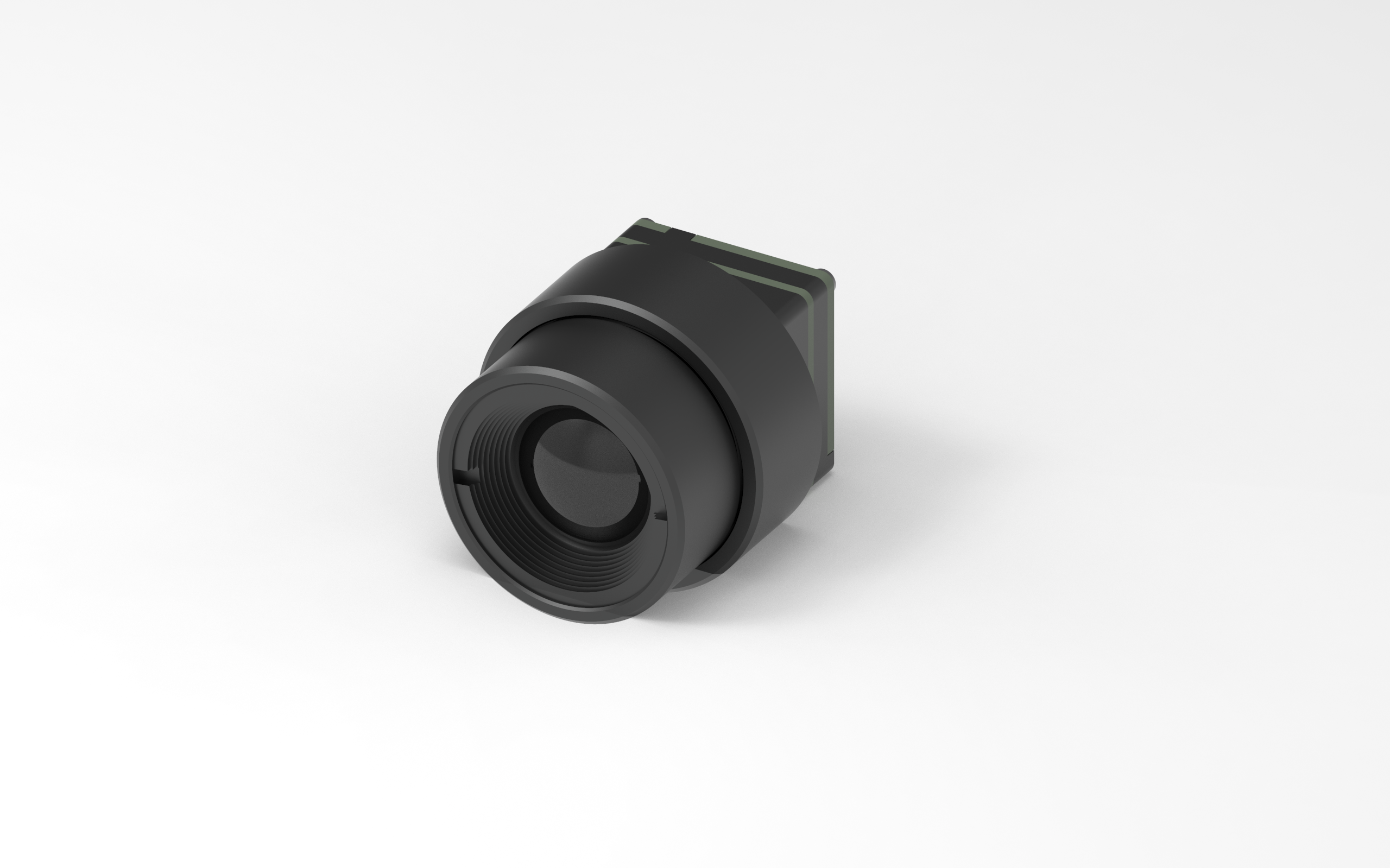
When you pick a thermal camera module for your UAV, you should know the main technical details. These details help you find the right camera for your job and get good results. Here are the most important things to look at.
Resolution and Image Quality
Resolution shows how many pixels the thermal camera uses to make a picture. If the camera has more pixels, you see more details in the image. For example:
A 1280×1024 thermal camera shows four times more detail than a 640×512 camera.
High resolution helps you notice small temperature changes, which is important for work.
Better thermal resolution lets you see things from farther away and makes your UAV more helpful.
The Verytek UVR series has three thermal resolution choices: 640×512, 384×288, and 256×192. You can choose the one that fits your job.
NETD and Sensitivity
NETD means Noise Equivalent Temperature Difference. It tells you how well the thermal camera can see small temperature changes. If the NETD is lower, the camera is more sensitive. This helps you get clear pictures, even when the temperature changes are very small. The UVR series uses special sensors and image tools to give you high sensitivity and clear thermal pictures.
Temperature Range
You should know the temperature range your thermal camera can measure. This tells you what kinds of jobs you can do with it. Many top UAV thermal cameras can measure from -20°C to 550°C. Some cameras, like the EVIDIR alpha, can even measure from -40°C to 600°C.
Camera Model | Temperature Range |
|---|---|
EVIDIR alpha thermal imaging camera | -40°C to 120°C, 0°C to 600°C |
Thermal Camera Module | -20°C to 550°C |
The Verytek UVR series can measure a wide range of temperatures, so you can use it for many jobs.
Lens and Field of View
The lens and field of view decide how much area your thermal camera can see at one time. You need to pick the right lens for your mission.
Picking the right lens focal length and being able to zoom are important for different jobs. A continuous zoom lens is the best and most flexible way to meet the need for different focal lengths. It helps you find and identify targets better.
The UVR series gives you different lens choices, so you can match your thermal camera to your UAV.
If you know about these thermal camera details, you can pick the best module for your UAV. The Verytek UVR series gives you high resolution, strong sensitivity, a wide temperature range, and different lens choices for good performance.
Matching Drone Thermal Imaging to Applications
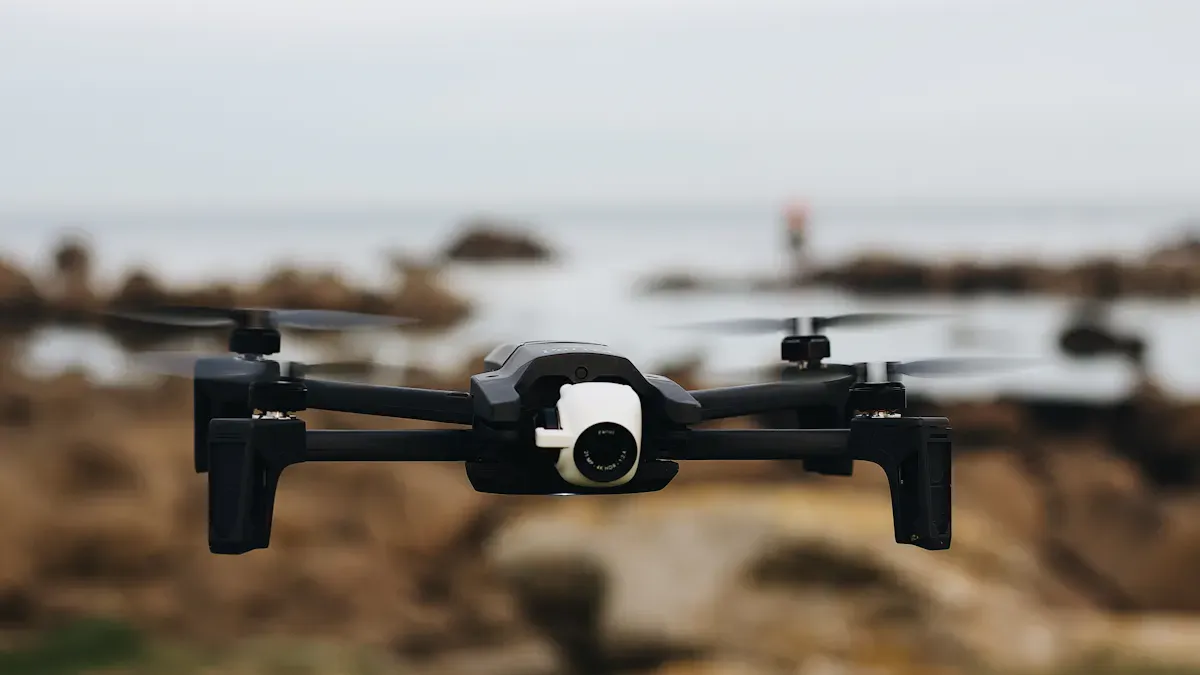
When you pick a thermal imaging drone, think about your needs. Every job needs something different. Look at sensor resolution and sensitivity. Make sure the camera fits your UAV. Picking by job helps you get good results.
Inspection and Surveying Needs
Thermal drone inspections help you find problems early. You can check power lines, solar panels, or buildings. For these jobs, focus on:
Thermal sensitivity (NETD): This shows if your camera finds small temperature changes. High sensitivity helps you see problems sooner.
Temperature measurement accuracy: This tells you if a hot spot is a real issue.
Lens and standoff distance: The right lens lets you see from far away. This keeps inspections safe.
Zoom thermal payloads: These let you check things without flying too close.
Pick a thermal inspection camera that fits your UAV and the area you need to cover. The Verytek UVR series gives you choices for sensor resolution and lens. This helps you do many inspection jobs.
Search and Rescue Operations
In search and rescue, you must find people fast. A thermal imaging drone helps you see heat, even at night or in fog. Look for:
Feature | Description |
|---|---|
High Resolution | 640×512 or higher for clear heat signature images, especially at altitude. |
Frame Rate | 30Hz+ for smooth video feed with less lag during operations. |
Thermal Sensitivity | ≤50 mK for better detection of faint temperature differences. |
You want a camera that gives you clear, live images. This helps you search big areas and find people quickly.
Agriculture and Environmental Use
Farmers use thermal drones to check plant health and water stress. High sensor resolution and wide coverage help you see small crop changes. This is important in dry places where checking by hand is slow. For the environment, you can use the same UAV. Thermal imaging drone cameras give you more flexible and fast data than old sensors. You can fly over forests, rivers, or fields and get real-time thermal inspection results.
Security and Surveillance
For security, you need a camera that spots people or animals in the dark. Look for high sensor resolution and low NETD. This gives you sharp images and helps you measure temperatures well.
Specification | Requirement |
|---|---|
Thermal Sensitivity | Lower NETD is better; ideal is 20 mK for security applications |
Resolution | Higher resolution provides more detail and accuracy in measurements |
You can use a thermal inspection drone to watch borders, buildings, or big areas. The right camera helps you see details and act fast.
If you match your UAV and camera specs to your job, you get better results and safer flights.
Integration and Compatibility
When you pick a thermal camera module for your UAV, you need to think about how it works with your drone. Good integration means your camera and drone work well together. You want the camera to fit, connect, and work with your software.
Mounting and Physical Fit
Check if the thermal camera module fits your UAV. The size and weight are important. A light camera, like the Verytek UVR series, is easier to add. Look at how the camera attaches to your drone. Some cameras use normal mounts, but some need special brackets. Good integration keeps the camera safe during flight. Watch out for heat from other devices. Some radar modules get hot and can affect the thermal camera. Too much heat can make the camera less sensitive or cause problems. Test your setup to stop these issues.
Some common problems are:
Heat from other devices can make the camera less sensitive or break it.
Your drone may need different voltage or current, so you must test to make sure everything works together.
Radar can cause electromagnetic interference and hurt image quality, but you can fix this with good shielding and careful placement.
Data Output and Connectivity
You need to connect your thermal camera to your UAV’s system. Good integration lets you get data fast and clear. Many modules, like the UVR series, have digital interfaces for easy connection. Check if the camera supports the data output your drone needs. Some cameras use USB, others use Ethernet or serial ports. Good integration gives you real-time images and keeps the camera sensitive. You also want to stop data loss during flight.
Software and Control Integration
You need software to control your thermal camera and look at the images. The right software helps you use all the camera’s features. Many people pick software that works with their camera module. Here are some popular platforms:
Software Platform | Functionality |
|---|---|
FLIR Thermal Studio | Looks at single thermal images. |
Autel Thermal Analysis Tool | Checks single thermal images. |
DJI Thermal Analysis Tool | Works with single thermal images. |
Pix4D Mapper | Puts thermal images together to make big maps for analysis. |
DroneDeploy | Processes thermal images for full analysis. |
QGIS | Adds thermal data to facility maps and old inspection data. |
ArcGIS | Helps manage and study thermal data with other information. |
Pick software that fits your mission and works with your camera. This helps you get the best results from your UAV system.
Power and Performance
Power Consumption
You need to check how much power your thermal camera uses. Power consumption affects how long your drone can stay in the air. Every extra watt means your battery drains faster. If you pick a camera with low power use, you get longer flights and more time to collect data. Many thermal drone technology modules, like the Verytek UVR series, use less than 0.7W. This helps you save energy and keep your drone in the air longer.
Here is how power and weight affect your drone’s performance:
Aspect | Impact on UAV Performance |
|---|---|
Weight | Every gram affects flight time and stability. |
Power Consumption | Every extra watt shortens endurance. |
Thermal Camera Technology | Lightweight thermal cores improve efficiency. |
Weight and SWaP Considerations
You should always look at the weight of your thermal camera. Even a small increase in weight makes your drone use more energy. This means shorter flight times. If you choose a lightweight camera, you can carry more sensors or fly longer.
Adding more weight reduces flight time.
Even a small payload drains the battery faster.
Drones with flexible payloads can do more jobs in one flight.
Thermal drone technology keeps getting better. New thermal imaging modules weigh less and use less power. This helps you get better quality images without losing flight time. SWaP stands for Size, Weight, and Power. If you pick a camera with good SWaP, you get better performance and lower cost.
Impact on Flight Time
Flight time is important for every mission. If your thermal imaging camera uses less power and weighs less, your drone can fly longer. A study shows that adding just one kilogram to a drone can cut flight time by up to 30 percent. You want to keep your drone light and use efficient thermal drone technology. This gives you more time in the air and better results.
Thermal drone systems with smart SWaP design help you finish more work in one flight. You save cost and get higher quality data. When you pick thermal drone solutions, always check power, weight, and size. This helps you get the best performance for your mission.
Step-by-Step Selection Guide
Picking the right thermal imaging camera for your UAV can seem hard. You can make it easier by following simple steps. This guide helps you avoid mistakes and get good results for your mission.
Define Your Needs
First, think about what you want to do with your UAV and thermal imaging camera. You should:
Figure out the main job for your thermal imaging camera. Are you checking power lines, looking for lost people, or watching crops?
Pick a drone that can carry the camera and other gear.
Think about what training and tools you need for safe flights.
Tip: Write down your goals before you look at cameras. This helps you stay on track and not buy things you do not need.
Prioritize Key Specs
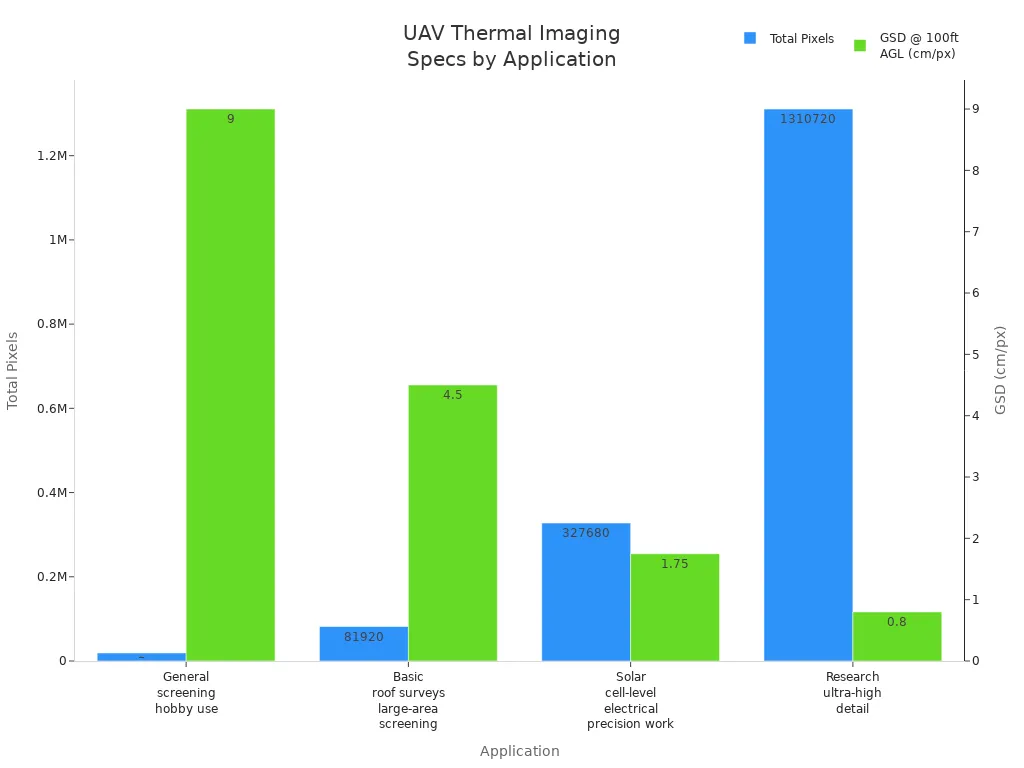
You need to match the camera’s specs to your job. The most important specs are resolution, NETD, frame rate, and lens choices. Use the table below to see how different resolutions work best for different jobs:
Resolution | Total Pixels | GSD @ 100ft AGL | Best Application |
|---|---|---|---|
160×120 | 19,200 | ~8–10 cm/px | General screening, hobby use |
320×256 | 81,920 | ~4–5 cm/px | Basic roof surveys, large-area screening |
640×512 | 327,680 | ~1.5–2 cm/px | Solar cell-level, electrical, precision work |
1280×1024 | 1,310,720 | <1 cm/px | Research, ultra-high detail |
Higher resolution means you see more details. This is important for jobs like checking solar panels or electrical work. NETD shows how small a temperature change the camera can find. Most good cameras have a NETD of 30–50mK. This helps you spot problems early.
Most UAV thermal imaging cameras use the LWIR band. This band works best for things at normal temperatures. Frame rate changes how smooth your video looks. Common rates are 9Hz or 30Hz. The lens focal length changes how much you see and how clear the image is.
Note: If you need to find small problems or tiny temperature changes, pick a camera with high resolution and low NETD.
Evaluate Integration
You must check if the camera fits your UAV. Look at the size and weight. Make sure the camera has the right digital ports for your drone. Many new cameras, like the Verytek UVR series, have many ways to connect. You should also check if your software can control the camera and use the images. Good integration gives you real-time data and smooth flying.
Always test your full drone setup before your first real flight. This helps you find and fix problems early.
Assess Power and Weight
Power and weight change how long your drone can fly. Light cameras and efficient sensors help you fly longer and cover more area. Every extra gram makes flight time shorter. Cameras that use less power, like the Verytek UVR series, help save battery life. Always check the camera’s weight and power use before you buy.
Remember: A lighter camera lets you carry more sensors or fly longer. Efficient sensors also keep your drone steady and safe.
Compare and Decide
Now you can compare your top picks. Make a list of cameras that fit your needs, work with your drone, and fit your budget. Look at:
Resolution and sensitivity
How well the camera works with your UAV and software
Power use and weight
Lens choices and field of view
Price and support
Pick the camera that gives you the best mix for your mission. If you follow these steps, you will avoid mistakes and get the most from your UAV and thermal imaging camera.
Common Mistakes to Avoid
When you choose a thermal camera module for your UAV, you want to avoid common mistakes. These mistakes can lead to poor results, wasted money, or even failed missions. Here are the main pitfalls you should watch out for:
Ignoring Integration
You need to make sure your camera works well with your drone. If you ignore integration, you may face problems like:
Noisy power or grounding can cause banding, fixed pattern noise, or even camera reboots.
Poor thermal design can lead to calibration drift. The image may look fine when cold but become blurry when hot.
Bad optics or focus can cause image loss that you cannot fix with software.
Mechanical vibration or gimbal jitter can blur your images and make it hard to recognize targets.
Wrong field of view or lens choice means you do not see what you need for your mission.
Issues with data encoding or latency can make your video lose important details.
Problems with time sync or software can give you great images at the wrong moment.
Tip: Always test your full system before flying. Make sure every part works together.
Underestimating Power Needs
You must check how much power your camera uses. If you do not, your drone may not fly as long as you need.
Power is not just a number on a datasheet. Power controls how long your drone can stay in the air. Every watt your camera uses takes away from flight time and coverage.
The weight of the camera matters for drones with small payloads.
A lightweight camera helps your drone fly longer and stay stable.
Choosing Wrong Resolution
Picking the wrong resolution can ruin your mission. If you choose too low, you may miss small targets or mix up threats and safe objects.
Higher pixel counts help you spot small targets from farther away.
You need enough pixels on a target to identify it clearly.
High resolution lets you zoom in without losing image quality.
Selecting the right resolution gives you better detection and recognition.
Overlooking Environmental Factors
You should always think about the environment where you will fly.
Ambient temperature can affect how your camera works.
Sunlight angle changes what you see in your images.
Wind, fog, and rain can make it harder to get clear pictures.
Note: Plan your mission with weather and lighting in mind. This helps you get the best results from your thermal camera.
Quick Checklist for Thermal Camera Module Selection
Use this checklist to help you pick the right thermal camera module for your UAV. Go through each step before you buy anything. This will help you avoid mistakes and get the best results for your mission.
✅ Key Points to Review
Define Your Mission
Write down what you want your UAV to do. Jobs like inspection, search and rescue, farming, or security need different camera features.Check Camera Resolution
Pick a resolution that matches your job. High resolution gives you more detail. Low resolution is fine for simple jobs.Review NETD (Thermal Sensitivity)
Look for a low NETD value. This means your camera can see small temperature changes.Select the Right Lens and Field of View
Choose a lens that covers the area you need. Wide lenses see more space. Narrow lenses can see farther away.Confirm Temperature Range
Make sure the camera can measure the temperatures you expect for your mission.Test Integration with Your UAV
Check if the camera fits your drone. Make sure it connects to your system and works with your software.Assess Power and Weight
Pick a lightweight camera that uses little power. This helps your drone fly longer.Compare Data Output Options
Make sure the camera gives you the data format you need. USB, Ethernet, or serial ports are common choices.Plan for Environmental Conditions
Think about weather, sunlight, and other things that can affect your camera.
📋 Quick Reference Table
Step | What to Check |
|---|---|
Mission | Inspection, rescue, farming, security |
Resolution | 640×512, 384×288, 256×192 |
NETD | Lower is better (e.g., ≤50 mK) |
Lens/FOV | Wide or narrow, based on your needs |
Temp Range | Matches your mission |
Integration | Fits and connects to your UAV |
Power/Weight | Under 10g, low power (<1W) |
Data Output | USB, Ethernet, Serial |
Environment | Weather, lighting, interference |
Tip: Always test your full UAV and camera setup before your first real mission. This helps you find problems early and fly with confidence.
You can use this checklist every time you pick a new thermal camera module. Careful planning helps you have better flights and get better data.
You can pick the right thermal camera module by following easy steps. First, decide what you want your drone to do. Next, look at the specs and see if they fit your needs. Always check if the camera works with your drone. Make sure to check how much power it uses and how heavy it is. Use the checklist to help you choose. If you are not sure, ask a supplier or an expert for help. Matching the specs to your job gives you the best results. For good performance, try trusted options like the Verytek UVR series.
FAQ
What is a thermal camera module and why do you need it for your UAV?
A thermal camera module helps your UAV see heat. You use it to find temperature changes. This helps you spot problems, people, or animals. Many people use a thermal camera module for safety, checking things, and search missions with a thermographic camera drone.
How does a thermal camera work on a thermographic camera drone?
A thermal camera finds heat from objects. The thermographic camera drone carries the thermal camera in the sky. You can see hot and cold spots on your screen. This helps you check buildings, fields, or look for missing people.
What should you check before buying a thermal camera for your drone?
You should look at the resolution, weight, and power use of the thermal camera. Make sure the thermal camera module fits your drone. Test if the thermographic camera drone works with your software. Always check if the thermal camera gives you clear pictures.
Can you use a thermal camera for both day and night flights?
Yes, you can use a thermal camera during the day or at night. The thermal camera does not need light to work. The thermographic camera drone can see heat in darkness, fog, or smoke. This makes the thermal camera good for many jobs.
Why do people choose a thermographic camera drone over a regular camera drone?
A thermographic camera drone can see heat, not just light. You use a thermal camera to find hidden problems, check crops, or spot people at night. The thermal camera module gives you more information than a regular camera.
See Also
The Importance of Thermal Imaging Cameras in 2025
Utilizing Thermal Imaging Cameras for 2025 Rescue Operations
Vanadium Oxide Thermal Imaging Cameras for Effective Rescue