

Most OEM thermal imaging projects focus on uncooled VOx 640×512/12μm modules. Programs with tight budgets pick 256×192 or 384×288. Long-range security and wide-area monitoring pick 1280×1024.
Higher resolution gives more detail and a longer detection range. It also adds cost, power, data throughput, and integration complexity. An uncooled thermal camera with a 1280×1024 array has four times the pixel count of a 640×512 core. So host processing and storage must grow to match.
Choosing a thermal camera core depends on the application, not the spec sheet. This comparison gives OEM engineers and procurement teams an unbiased, side-by-side view of each thermal camera module tier. It covers everything from entry-level 256×192 to high resolution thermal camera module options. That way, every thermal imaging module choice fits its real deployment.
Key Takeaways
Higher resolution gives you more detail and a longer range. It also makes cost, power needs, and setup difficulty go up.
Pick the resolution that fits your task: 256×192 for low-cost devices, 384×288 for mid-range diagnostics, 640×512 for common OEM products, and 1280×1024 for long-range security.
The 640×512 tier is the most common OEM choice. It balances detail, sensitivity, and cost well for many applications.
A 1280×1024 module needs a faster host and more storage. Plan for four times the data of a 640×512 stream.
Uncooled modules work for most OEM projects. Cooled modules give you more sensitivity, but they cost more and need regular upkeep.
Thermal Camera Module Resolution Comparison Table
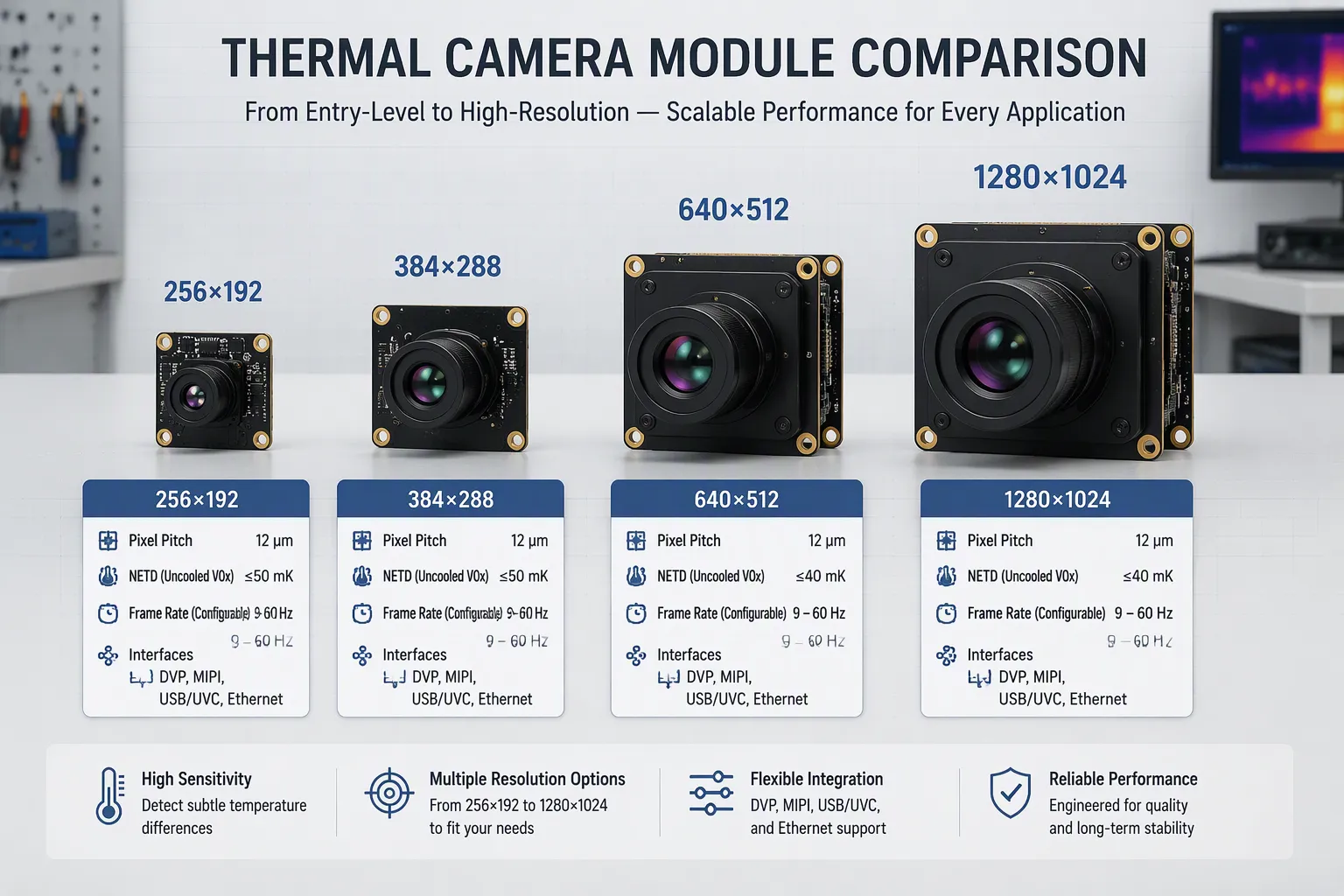
The table below puts the four main tiers side by side. It lists pixel format, pixel pitch, NETD, frame rate, interface, typical application, and the matching VERYTEK model. Engineers and buyers can use it as a first-pass resolution comparison before they ask for samples.
Resolution | Pixel Pitch | NETD | Frame Rate | Interface | Typical Application | VERYTEK Model |
|---|---|---|---|---|---|---|
256×192 | Supplier-dependent | Uncooled VOx class | Configurable | DVP, MIPI, USB/UVC | Consumer devices, basic monitoring, occupancy sensing | UVR 256 |
384×288 | Supplier-dependent | Uncooled VOx class | Configurable | DVP, MIPI, USB/UVC | Mid-range industrial, building diagnostics, entry security | UVR 384 |
640×512 | 12 μm | Uncooled VOx class | Configurable | USB/UVC, MIPI, DVP, Ethernet | Drone IR cameras, field inspection, mainstream OEM products | UVR 640, UVG6 17×17mm, UVT 640 |
1280×1024 | 12 μm | Uncooled VOx class | Configurable | Ethernet (RTSP/ONVIF/H.264/H.265), USB/UVC | Long-range security, border surveillance, wide-area monitoring | UVL12, UE12L, TF1920 |
Resolution, Pixel Pitch, NETD, and Frame Rate
Pitch sets the trade-off between die size and optics. The 640×512 and 1280×1024 sensors in the table both use a 12 μm pitch, a common industry value. A 1280×1024 array carries 1,310,720 active pixels. That is four times the spatial information of 640×512. The resolution & pixel pitch pairing therefore drives lens focal length, module footprint, and detection range. Lens focal length follows from pitch and format, so a 12 μm sensor needs a shorter lens than a larger-pitch part for the same field of view. Smaller formats such as 256×192 and 384×288 keep the die and the optics compact, which suits space-limited products. Thermal resolution and NETD together define what an operator can actually see. A lower NETD value means the module resolves smaller temperature differences. That capability often matters more than pixel count in diagnostic work. Frame rate choices run from slow radiometric capture to smooth video, and the host processing budget must match the selected rate.
Interfaces and Typical Applications
Interface choice shapes host hardware and firmware effort. DVP and MIPI suit compact embedded boards with tight space. USB/UVC lets a host treat the thermal imaging module as a standard camera with no custom driver. Ethernet with RTSP, ONVIF, and H.264/H.265 encoding pushes the stream onto a network and cuts host processing load. VERYTEK supplies SDK and protocol documentation for each module, which shortens firmware work. The 1280×1024 tier fits several demanding roles:
Perimeter and site surveillance, where motion and intrusion detection pair with Ethernet output.
Remote infrastructure observation at industrial sites and infrastructure locations.
Integrated electro-optical systems that combine visible and infrared channels.
Network-ready OEM surveillance platforms with digital zoom, image enhancement, and lens driving.
Uncooled LWIR technology supports every tier in this thermal camera module lineup. An uncooled thermal camera needs no cryogenic cooling, so compact system designs stay practical. The 640×512 tier remains the mainstream OEM pick for drone IR cameras and field inspection. Array resolution alone does not decide fit. Power, size, throughput, and budget decide it together. A 1280×1024 stream carries four times the data of 640×512 at the same frame rate, so link bandwidth and storage grow with the choice. Each tier fits a defined job.
256×192: Entry-Level Thermal Resolution
Performance and Application Fit
The 256×192 format is the starting point of the thermal camera module range. Its 49,152 pixels capture broad heat patterns rather than fine detail. Small targets at a distance blur into a few pixels, so this format works best for short-range jobs. A 256×192 usb thermal camera plugs into a host and streams video without a custom driver. DVP and MIPI options serve compact embedded boards instead. Frame rate stays configurable, and the uncooled thermal camera design keeps the module small and ready to power up in seconds.
This thermal resolution fits consumer devices, basic monitoring, and occupancy sensing. A room sensor only needs to know whether people are present, and 256×192 answers that question well. Budget security cameras and simple inspection tools also work within these limits. The 256 × 192 array gives a clear thermal picture at close range, and that picture covers most entry-level jobs.
Cost, Compliance, and Integration
Module price positioning makes 256×192 the lowest-cost tier in the lineup. The small die and simple optics lower oem sensor & module cost drivers across the board. Pixel pitch stays modest, so lenses cost less than the 12 μm optics used at higher tiers. Export-control classification depends on frame rate and on the end use, and buyers should confirm the classification with the supplier before shipping. The minimal footprint makes integration into space-limited products simpler, and the low data rate eases host processing demands.
An oem team can move from sample to small batch quickly at this tier. VERYTEK supplies SDK and protocol documentation, so firmware work stays short. The 256×192 format therefore fits cost-sensitive programs that need a working thermal channel without a large budget.
384×288: A Balanced Middle-Tier Resolution
Performance and Application Fit
The 384×288 format is one step above the entry tier. It has more than twice the pixels of a 256×192 array, so small targets keep their shape from farther away. A person or a hot part stays easy to recognize at a longer distance from the lens. That extra reach changes what one thermal camera module can cover. People often cite the 384×288 array as the smallest native resolution for general diagnostics. Technicians can read heat patterns on a circuit board or a wall without guessing at blurry blobs.
Mid-range industrial inspection, building diagnostics, and entry security all fit this tier. A building survey needs enough detail to spot a failing seal or a wet patch. An entry-level security camera needs enough pixels to flag an intruder at the fence line. The 384×288 format handles both jobs at a moderate pixel pitch and a modest data rate. Teams that outgrow 256×192 often find the 384×288 tier meets the need without a jump to premium pricing.
Cost, Compliance, and Integration
A 384 × 288 thermal imaging module costs more than the entry tier. A larger die and slightly longer optics raise the module price, yet the gap to 640×512 stays wide. Buyers should weigh that difference against the range gain. When a project needs reliable diagnostics or a longer detection distance, the extra pixels justify the spend. When it only needs presence detection, the entry tier still wins.
Compliance work deserves early attention. Export control rules apply to thermal modules, and US-origin items fall under ITAR as the cited example. Buyers should confirm the classification path with the supplier before shipping. VERYTEK supports oem customers with SDK and protocol documentation, so integration effort stays predictable. The 384×288 tier therefore balances capability, cost, and a manageable integration footprint.
640×512: The OEM Sweet Spot
Performance and Application Fit
The 640 × 512 format is the most common pick for OEM integration, and the reasons make sense. A 12 µm VOx uncooled focal plane array at this size balances detail, sensitivity, and cost. Most modules keep NETD below 20 mK, and some reach 15 mK or better. That sensitivity lets an uncooled thermal camera pick out small temperature differences in the field. Frame rate choices usually include 30, 50, and 60 Hz, so designers can trade smoothness for data load.
Detector: 12 µm VOx uncooled array
NETD: below 20 mK, with some parts at 15 mK or better
Refresh: 30, 50, or 60 Hz, adjustable
Common lens: 35 mm germanium, F/1.0
A 640 × 512 array has enough pixels for reliable detection and recognition at working distances that suit drone IR cameras and standard field inspections. Radiometric versions report temperature per pixel, which inspection teams need. The 640×512 tier also takes a wide range of lenses, so one thermal camera module can serve several products.
Cost, Compliance, and Integration
Market pricing shows where this tier sits. Suppliers list 640×512 modules from roughly $300–600 at low minimum order quantities, and some quote $399–459. Higher-grade or radiometric builds run from $2,050–4,600. A 384×288 module starts near $238–280, so the step up costs more but buys real range. The 640×512 tier wins on cost per performance for most programs, and it shapes oem sensor & module cost drivers less than the premium tier does.
Compliance pathways are well established for this class. Export classification still depends on frame rate and end use, so buyers should confirm it early. Integration maturity is the strongest argument. Vendors supply SDKs, protocol documents, and a broad lens ecosystem. The 640 × 512 pixel pitch of 12 µm matches common optics, which keeps lens sourcing simple. An oem team can move from sample to volume with predictable effort. The 640×512 format therefore remains the default for mainstream thermal imaging module programs.
1280×1024: High-Resolution Thermal Imaging
Performance and Application Fit
The 1280×1024 format is the top choice in the uncooled lineup. Its 1,310,720 active pixels hold four times the spatial information of a 640 × 512 array. That pixel density keeps small targets sharp across a wide field of view. A high resolution thermal camera module can capture a broad scene and still show fine detail inside it. Long-range security teams detect threats earlier at the perimeter. Border surveillance crews spot movement across open ground. Wide-area monitoring systems cover more land per unit. Inspection teams read small thermal features without moving the camera closer.
The 1280×1024 tier also increases data throughput. A full frame carries four times the payload of 640×512 at the same frame rate. Host processors, links, and storage must grow to match. Ethernet output with H.264/H.265 encoding eases that load by compressing the stream before it leaves the module. Buyers should size the host around the full data rate, not the compressed rate.
Cost, Compliance, and Integration
Module cost goes up at this tier. A larger die and longer optics push the price well above mainstream parts. Power draw and heat rise with the pixel count, so the housing needs a thermal path that keeps the detector stable. Export-control scrutiny is stricter here. Frame rate and end use drive the classification, and buyers should confirm the path with the supplier before shipping.
Integration complexity grows as well. The 1280×1024 pixel pitch of 12 μm matches common optics, which helps lens sourcing. Still, the oem team must plan for higher bandwidth, more memory, and careful thermal design. VERYTEK supports this tier with SDK and protocol documentation, so firmware work stays predictable. The 640 × 512 format remains the default for most programs. The 1280×1024 thermal imaging module earns its premium where range and detail decide the outcome.
Cooled vs Uncooled Modules
Cost and Lifetime Trade-Offs
An uncooled thermal camera uses a VOx microbolometer that works at normal room temperature. A cooled thermal camera module adds a cryocooler that pushes the detector down to very cold temperatures. This cooling step lowers heat-caused noise below the scene signal, so the detector can pick out smaller temperature differences. The gain in sensitivity is real, but it comes at a price.
Cooled systems cost much more to buy and to keep running. The cryocooler adds moving parts, uses extra power, and has a limited service life. It also needs regular upkeep that an uncooled lwir thermal imaging module never needs. An uncooled module just powers up and streams. Buyers comparing a 640 × 512 uncooled core to a cooled part should treat the cooler as a part that wears out and needs replacing on a set schedule, not as a one-time purchase.
Applications That Justify Cooled Sensors
Cooled detectors are worth their higher price when sensitivity or speed decides the result. High-speed events need short exposure times, and cooling allows much faster image capture. Long-range optics gain from the lower NETD, because a faint target stays visible across a narrow field of view. Optical gas imaging of hydrocarbon leaks is a classic cooled use, since gas plumes make very little contrast against the background.
Scientific measurement also fits this class. Researchers can choose different infrared wavebands based on the detector technology, a flexibility an uncooled long-wave infrared camera module does not offer. For mainstream oem products, the 640 × 512 uncooled tier stays the practical default. A 12 μm pixel pitch keeps optics affordable, and integration stays simple. Cooled hardware fits the small set of programs where its sensitivity is worth the upkeep.
Interface and Integration with VERYTEK Modules
USB/UVC, MIPI, DVP, and Ethernet (RTSP/ONVIF/H.264/H.265)
The interface you pick decides how much work the host board must do. A usb thermal camera module with UVC output needs no custom driver. The host sees a standard camera, so firmware effort stays small. MIPI and DVP suit compact embedded boards where space is tight and a camera port already exists. Ethernet moves the stream onto a network and shifts encoding work to the module.
VERYTEK network modules support TCP/IP, HTTP, and RTSP. They also meet ONVIF rules and encode H.264/H.265 video over an RJ45 connector. Digital zoom runs from 1× to 8×. With that mix, an oem team can build a network-ready product without writing a video stack. A usb thermal camera module is still the fastest path for prototypes and low-volume builds.
SDK, Protocols, and Mechanical/Power Constraints
VERYTEK supplies SDK and protocol documentation with each thermal imaging module, so integration effort stays predictable. Mechanical limits vary by model. The UE12L 1280×1024 module carries these figures:
Specification | Value |
|---|---|
Supply voltage | DC 12 V |
Power consumption | ≤2.5 W, steady state at 25°C |
Dimensions (without lens) | 43 × 43 × 56 mm |
Weight (without lens) | <250 g |
The UVG6 packs a 640 × 512, 12 μm detector into a 17 × 17 mm body. It fits compact embedded devices, handheld systems, ADAS, and surveillance gear. Its height and weight are not published, so designers should check clearance with a sample. Lens options span multiple focal lengths, and the 12 μm pixel pitch keeps optics sourcing simple. Plan power, mounting, and lens clearance early in oem integration to avoid late redesigns.
OEM Workflow with VERYTEK
From Requirements Assessment to Mass Production
A clear workflow keeps a thermal camera module program on schedule. VERYTEK starts by checking what the project needs. Engineers review the target application, detection range, field of view, power budget, and host interface. Then they suggest a resolution tier and a lens option that fit the job. This step stops costly redesigns later in oem integration.
The next stage sends samples for bench testing. The customer checks image quality, SDK behavior, and mechanical fit on its own hardware. Customization comes next: lens selection, firmware configuration, and housing adaptation. A small batch then confirms the production process before mass production begins. Each stage has a clear exit point, so both teams know when to move forward.
Customization, Samples, and Supply
VERYTEK gives engineering support through the whole cycle. The team helps with interface selection, protocol documentation, and firmware tuning. Customization covers lens focal length, output format, and enclosure design. Sample units let buyers test the thermal imaging module against real scenes before they commit to volume.
Supply stays steady for volume programs. Lead times depend on model and order quantity, and the team confirms them at quotation. OEM/ODM service scope covers OEM brands, distributors, and system integrators. That scope includes customized hardware, product configuration, and project-oriented development. Buyers get one partner for design, manufacturing, and export support, which makes integration simpler and shortens time to market.
Decision Guide by Scenario
Budget, Mid-Range, and Premium Scenarios
Budget programs need a working thermal channel at the lowest cost. Consumer devices, occupancy sensing, and basic monitoring fit the 256×192 tier. A 256 × 192 module keeps the die small and the optics simple. The 384×288 format suits a project that needs readable diagnostics but cannot fund a premium part. Building surveys and entry security sit here. The 640 × 512 tier serves mainstream OEM products, drone IR cameras, and field inspection. Long-range security and wide-area monitoring justify the 1280×1024 tier.
Scenario | Application | Detection Range | Power Budget | Module Cost Signal | Recommended Tier |
|---|---|---|---|---|---|
Budget | Occupancy sensing, basic monitoring | Short | Tight | Lowest | 256×192 |
Mid-range | Building diagnostics, entry security | Moderate | Moderate | Below mainstream | 384×288 |
Mainstream OEM | Drone IR, field inspection | Working distances for inspection | Moderate | $300–600 at low MOQ | 640 × 512 |
Premium | Border and perimeter surveillance | Long | Generous | Well above mainstream | 1280×1024 |
Every tier is the best fit somewhere. A buyer who ranks tiers as always better or worse misses the point. The 256×192 part wins where cost and size decide the sale. The 1280×1024 part wins where range and detail decide the outcome.
Matching Resolution to Range and Power Budget
Range comes from pixel count and lens choice working together. A 1280×1024 array holds 1,310,720 active pixels, four times the spatial information of 640 × 512. That density keeps a distant target sharp across a wide field of view. A 640 × 512 core covers inspection work at closer working distances. The 12 μm pixel pitch on both tiers keeps lens sourcing simple. Thermal resolution alone does not set range, so buyers should pair the array with the right focal length.
Power and mechanical limits often settle thermal camera core selection faster than image quality does. The UE12L 1280×1024 module draws 2.5 W or less at steady state and measures 43 × 43 × 56 mm without a lens. The UVG6 fits a 640 × 512 detector into a 17 × 17 mm body. A handheld or battery-powered product may favor the smaller tier on power alone. A mains-powered surveillance unit can carry the premium tier without strain.
Data throughput belongs in the same calculation. A 1280×1024 stream carries four times the payload of 640 × 512 at the same frame rate. Host memory, link bandwidth, and storage must grow to match. Ethernet output with H.264/H.265 encoding eases that load. A high resolution thermal camera module still needs a host sized around the full data rate.
Integration effort stays predictable across tiers. VERYTEK supplies SDK and protocol documentation for each thermal imaging module. An uncooled thermal camera needs no cryocooler, so compact designs stay practical. A cooled thermal camera module earns its place only where sensitivity decides the result. For most oem integration programs, the 640 × 512 tier remains the default. The 1280×1024 tier earns its premium where range and detail matter most.
A higher resolution gives you more detail and a longer range. It also raises the price, uses more power, and makes setup harder. No single tier is best for every job. The right thermal camera module depends on what the application needs, how far it must detect, and what the host budget allows.
The decision logic is simple. Budget programs fit 256×192 or 384×288. Mainstream oem products fit 640×512. Long-range security and wide-area monitoring fit 1280×1024. Each resolution tier earns its place in a defined job.
VERYTEK AI TECH LIMITED builds all four tiers. Visit https://verytek.com for the product pages, download the spec-sheet PDF, and send an inquiry through the contact page. Add Product and FAQ Schema to this page for search visibility.
FAQ
How does an OEM team choose between the four resolution tiers?
The team starts by looking at detection range, field of view, power budget, and host interface. Budget programs work well with 256×192 or 384×288. Mainstream products work well with 640×512. Long-range security and wide-area monitoring work well with 1280×1024. VERYTEK reviews these inputs and suggests a tier with a lens that matches.
Is 640×512 always the right default for a thermal camera module?
No single tier works for every program. The 640×512 format is still the most common OEM pick. That is because a 12 μm uncooled VOx array balances detail, sensitivity, and cost. A compact or battery-powered product may need a smaller format just because of power and size.
Which interface should a thermal imaging module use?
USB/UVC works well for prototypes and low-volume builds, since the host needs no custom driver. MIPI and DVP fit compact embedded boards that already have a camera port. Ethernet with RTSP, ONVIF, and H.264/H.265 works for network-ready products and moves encoding work to the module.
What power and size limits should designers plan for?
The UE12L 1280×1024 module uses 2.5 W or less at steady state. It measures 43 × 43 × 56 mm without a lens. The UVG6 fits a 640×512 detector into a 17 × 17 mm body. Designers should check clearance and power headroom with a sample.
When does a cooled thermal camera module make sense over an uncooled one?
An uncooled thermal camera powers up and streams with no cryocooler. A cooled thermal camera module adds sensitivity and speed for high-speed events, long-range optics, gas imaging, and scientific measurement. Its cooler wears out on a set schedule, so buyers should plan for upkeep.
Does a high resolution thermal camera module need a faster host?
Yes. A 1280×1024 stream carries four times the payload of 640×512 at the same frame rate. Host memory, link bandwidth, and storage must grow to match. Ethernet output with H.264/H.265 encoding eases that load before the stream leaves the module.