
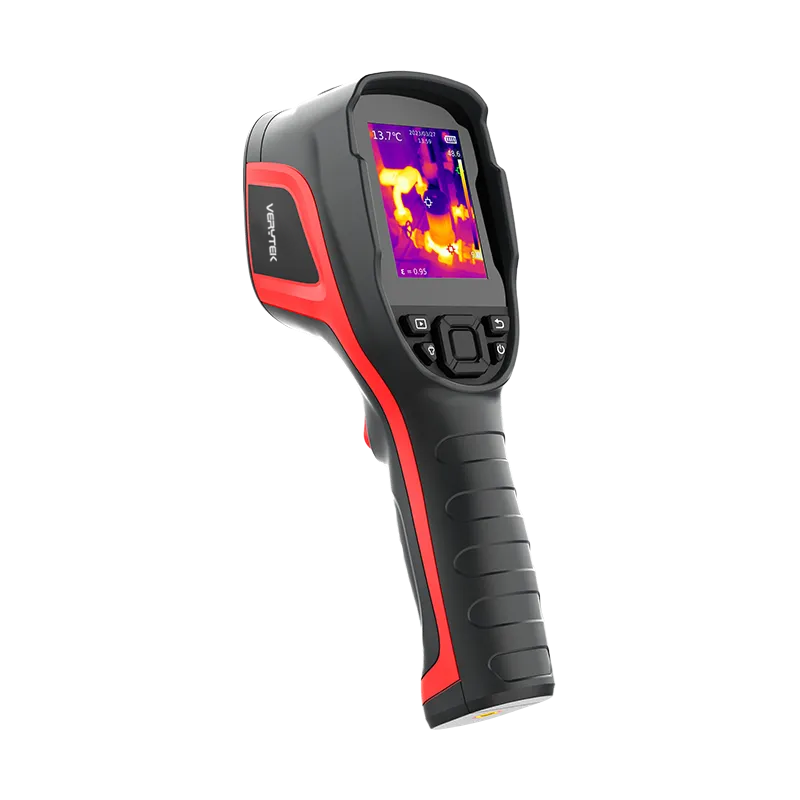
If you want a top handheld thermal scanner for work in 2025, you should look at the Verytek CX200 SE+. More people are buying these tools now. The value went from USD 1.2 billion in 2023. It may reach USD 2.3 billion by 2026. You need special features like high resolution and quick startup. You also need strong durability for good results in hard places. The CX200 SE+ gives clear images and is easy to use. It is tough enough for daily fieldwork.
Key Takeaways
The Verytek CX200 SE+ is a great pick for workers who need a strong thermal scanner in 2025.
It has a 256×192 resolution. It starts up fast in 6 seconds. The design is tough and has an IP54 rating.
Thermal imagers help you find problems fast in power systems, HVAC, and cars.
When you pick a thermal monocular, look at the resolution. Check the battery life. Make sure it is tough enough for your job.
Always look for good support and warranty choices. This helps your thermal imaging device last longer and work well.
Best Handheld Thermal Scanner Models 2025
Verytek CX200 SE+ Overview
If you need a handheld thermal scanner for tough jobs, the Verytek CX200 SE+ is a great pick for 2025. It uses a high-sensitivity infrared detector with 256×192 pixel resolution. This gives you sharp thermal images to find problems quickly. The CX200 SE+ turns on in only 6 seconds. You can use it for power work, HVAC leak checks, equipment checks, and car repairs. Its strong build lets it survive drops from 2 meters. The IP54 rating keeps out dust and water. The battery lasts about 9 hours, so you can use it all day. It has a 32GB memory card inside, and you can add more up to 128GB. This lets you save lots of images and videos. The interface is easy to use, so you can focus on your work instead of learning new controls.
Key Features and Upgrades
The CX200 SE+ has many features to help you work faster and better. Here are some important ones:
The 256×192 infrared detector gives you clear images.
Image+ technology helps you see small temperature changes.
NETD as low as 40mK lets you spot tiny temperature shifts.
The smart image algorithm makes pictures clearer for better study.
It starts up in 6 seconds, saving you time.
It switches temperature modes by itself for different jobs.
You can record video to keep track of what you find.
The tough build and IP54 rating protect it from drops and water.
The battery lasts about 9 hours for long work days.
It has 32GB of memory, and you can add more up to 128GB.
The software works with PC tools for detailed reports.
The simple interface makes it easy, even for beginners.
These features make the CX200 SE+ useful for many jobs. High resolution, smart image tools, and a strong build mean you can trust it anywhere. The software helps you check and report your results easily. Fast startup and auto mode switching help you work without waiting. Big storage means you will not run out of space. The battery lets you work all day. The tough design keeps it safe.
How It Compares to Other Thermal Imagers
You might wonder how the CX200 SE+ compares to other top handheld thermal scanners in 2025. Here are three main competitors:
Pulsar Telos LRF XP50 – This one has a 1024×768 sensor and can spot things up to 1,800 meters away. It is good for scanning far distances.
InfiRay Finder FH35R V2 – This scanner has a 640×512 sensor and a 35 mm f/0.9 lens. It comes with a laser rangefinder and costs about $2,499.
Burris Thermal Handheld – This model is made for hunting. It has 2–8× magnification and can detect things up to 700 yards away.
Each scanner has its own best use. The Pulsar Telos LRF XP50 is good for high resolution and long-range spotting. The InfiRay Finder FH35R V2 has a strong sensor and a built-in rangefinder. The Burris Thermal Handheld is best for outdoor and hunting with its zoom.
The Verytek CX200 SE+ is made for professional work. It is good for power, HVAC, equipment, and car jobs. Its strong build, fast startup, and smart image tools make it reliable for daily use. The software and storage help you handle your data easily. You get good performance, strength, and easy controls for many jobs.
Tip: When you look at handheld thermal scanners, check the features that matter most for your work. Think about resolution, image quality, battery life, toughness, and software. The right features will help you do your job faster and better.
Professional Applications for Handheld Thermal Imagers
Handheld thermal imagers are useful in many jobs. They help you find hidden problems fast. You can use them in different industries. High resolution and special features make your work easier. These tools help you do your job better.
Power Maintenance and Equipment Inspection
You use thermal imagers to check electrical systems. They help you find hot breakers and loose wires before they break. This stops costly problems and keeps things safe. You also use them to look at motors and pumps. Clear images show small heat changes that mean trouble. Fast startup and smart tools help you work faster. You save time and do not have to guess.
Find hot parts before they stop working.
Check machines without turning them off.
Save pictures and videos for your reports.
Note: High resolution and quick response let you spot problems early. This helps you do better work in the field.
HVAC and Leak Detection
Thermal imagers help you check HVAC systems and find leaks. You can see heat changes in ducts and coils. This helps you find leaks, drafts, and missing insulation. You make buildings more comfortable and save energy for your clients. Special features let you change modes fast and take clear pictures. You can check insulation without opening walls. This saves time and helps you do a better job.
See drafts and air leaks near windows and doors.
Check coil heat and ductwork for hidden problems.
Test insulation without breaking anything.
Tip: Using a handheld thermal imager with smart features helps you find HVAC problems faster. This helps you do better work every time.
Automotive and Industrial Uses
In car and factory work, you use thermal imagers to check engines and brakes. You get a heat map that shows hot spots or broken parts. You do not need to take things apart, so you save time. You can show customers pictures of what you find. This helps them trust you and shows your good work.
Find engine and brake problems fast.
Check wires and parts without taking them apart.
Show proof to customers with pictures.
Callout: Advanced thermal imagers help you work faster and get clear results. You can also keep good records.
You need high resolution, smart tools, and a strong design for the best results. These features help you work faster, safer, and with more confidence.
How to Choose the Best Handheld Thermal Monocular
Choosing the best handheld thermal monocular can feel overwhelming. You want a device that fits your job and gives you reliable results. This guide will help you compare key specifications, match features to your needs, and consider your budget.
Key Specifications to Compare
When you look for a handheld thermal monocular, you should check the main specifications. These details affect how well the device works in the field. Use the table below to compare important features:
Specification | What to Look For |
|---|---|
Sensor Resolution | Higher numbers mean sharper images. For professional work, pick at least 256×192 pixels. |
Thermal Sensitivity (NETD) | Lower NETD (like 40 mK or less) helps you see small temperature changes. |
Field of View (FOV) | Wide FOV lets you scan large areas. Narrow FOV helps you see faraway targets. |
Lens Focal Length | Longer lenses zoom in more but show less area. |
Detection & Recognition Range | Recognition range is about half the detection range. |
Battery Life | Look for 8-10 hours for long jobs. Replaceable or USB-C charging is a plus. |
Durability | IP54 or higher keeps out dust and water. Strong cases protect from drops. |
Display & Ergonomics | OLED screens show better contrast. Easy-to-use buttons help you work faster. |
Connectivity & Storage | Built-in memory and microSD slots let you save images and videos. |
Tip: Lower NETD values help you spot tiny temperature differences. This is important when you need to find small leaks or faults.
Matching Features to Professional Needs
You should match the features of your handheld thermal monocular to your job. Different industries need different tools. Here are some things to think about:
If you work in power or equipment inspection, you need high resolution and fast startup. This helps you find hot spots and fix problems quickly.
For HVAC and leak detection, look for smart image tools and wide FOV. These features help you scan large areas and spot drafts or missing insulation.
In automotive or industrial jobs, you want a tough device with long battery life. This lets you check engines, brakes, and wires without stopping work.
Many professionals also want automation features. Real-time data analysis and smart alarms can save you time. Lightweight designs make the device easy to carry. Long battery life means you can work all day without stopping. Advanced materials and strong cases keep your device safe in tough places. Smart connectivity, like Wi-Fi or Bluetooth, lets you send data to your computer or phone right away.
Note: The best handheld thermal monocular for you should fit your daily tasks. Think about what you do most and pick features that help you work faster and safer.
Budget and Value Considerations
You should always think about your budget when you buy a handheld thermal monocular. Prices can change a lot based on features and brand. Here are some tips to get the best value:
Decide which features you need most. Do not pay extra for things you will not use.
Compare models with similar specs. Look at resolution, NETD, battery life, and durability.
Check if the device comes with software for reports and analysis. Good software can save you time.
Think about long-term costs. A strong, reliable device may cost more at first but will last longer.
Look for good support and warranty. This protects your investment if something goes wrong.
Callout: Thermal imaging technology keeps getting better. New models offer more features for less money. Always check for the latest updates before you buy.
When you follow these steps, you can find the best handheld thermal monocular for your needs. You will get clear images, fast results, and a tool that lasts for years.
Best Handheld Thermal Monocular Comparison
CX200 SE+ Pros and Cons
If you want a good thermal monocular, you need one that works in many places. The CX200 SE+ is a top choice for professionals. Here are some good and bad points to help you choose:
Pros:
The 256×192 sensor gives you clear pictures.
Image+ technology helps you see small heat changes.
It starts up in just 6 seconds, so you can work fast.
The tough IP54 design keeps out dust and water.
The battery lasts all day, so you do not run out.
You can save lots of pictures and videos with big storage.
The simple controls make it easy for anyone to use.
Cons:
Some people may want even better resolution for special jobs.
This thermal imager is made for work, so it has features you might not need for simple tasks.
Tip: The CX200 SE+ gives you power, speed, and strength. You can count on this thermal imager every day.
Competing Models: Strengths and Weaknesses
You might see other thermal imagers when you look for the best one. Here is a table to help you compare them:
Model | Strengths | Weaknesses |
|---|---|---|
Pulsar Telos LRF XP50 | Sees far, has high resolution | Costs more, heavier to carry |
InfiRay Finder FH35R V2 | Strong sensor, has a rangefinder | Battery does not last as long |
Burris Thermal Handheld | Good for hunting, zooms in a lot | Not as clear for close work |
CX200 SE+ | Starts fast, tough, easy to use, great for daily checks | Made for work, not simple jobs |
Each thermal imager is best for different jobs. Pick the one that fits what you do most.
Ideal User Scenarios
You want the best thermal monocular for your work. Here are some examples to help you pick:
If you fix power systems, the CX200 SE+ helps you find hot spots fast.
For HVAC or leak checks, you need a thermal imager that sees small heat changes and gives clear pictures.
In car or factory work, a tough thermal imager like the CX200 SE+ keeps working in hard places.
If you need to see far away, the Pulsar Telos LRF XP50 is a good choice.
For hunting, the Burris Thermal Handheld gives you strong zoom.
Note: The best thermal monocular for you depends on your job. Always pick a thermal imager with features that help you most.
Buying Tips for Thermal Imagers
When you buy a thermal imaging device, you want it to last a long time. You use your infrared thermal imager in many places, so you need to trust it every day. You also want good help if you have questions or need repairs. Here are some tips to help you pick the right thermal imaging tool for your work.
Durability and Reliability
You use your thermal imaging device in rough places. It needs to handle dust, water, and drops. A strong case keeps your infrared thermal imager working, even with daily use. Look at the table below to see what to check for:
Durability Aspect | Description |
|---|---|
Build Quality | Make sure the thermal imager is built strong. |
IP Rating | Pick at least IP54 to block dust and water. |
Drop Resistance | Needed for fieldwork to survive drops. |
A good thermal imaging device should have a tough case. The IP54 rating means it keeps out dust and water. Drop resistance helps your device survive falls. You use your thermal imaging tool to check temperature in many places. It needs to work in hot, cold, or wet spots. A reliable device gives you the right temperature every time.
Tip: Always check the IP rating and drop test results before you buy. A tough thermal imaging device saves you money and trouble.
Support and Warranty
You want your thermal imaging device to last for years. Good help after you buy keeps your device working well. Here is what you should look for:
After-sales support is important when you buy a thermal imaging device.
You need help like calibration, maintenance, software updates, and training.
Fast help means you can fix problems quickly and keep working.
A strong warranty protects your money if something breaks.
You use your thermal imaging device to check temperature in many jobs. You want software that helps you read, save, and share temperature data. Good software lets you make reports and track temperature changes over time. This helps you show your work and find problems faster.
Note: Pick a thermal imaging device with easy-to-use software and strong support. This helps you get the most from your temperature checks and keeps your work smooth.
A good warranty and helpful support team give you peace of mind. You know you can trust your thermal imaging device to measure temperature right every time. You can focus on your job and not worry about your tools.
You need a thermal scanner that matches your work. The Verytek CX200 SE+ is quick to start and gives clear pictures. It is strong and can handle tough jobs. Picking the right features for your job helps you do better and saves time. Here is a simple table to help you choose:
Scenario | Best Choice |
|---|---|
Power Maintenance | CX200 SE+ |
HVAC/Leak Detection | CX200 SE+ |
Automotive/Industrial | CX200 SE+ |
Long-range spotting | Telos LRF XP50 |
Before you buy, think about how long it will last and if you can get help when needed. A good scanner helps you do your best work every day.
FAQ
What is a handheld thermal scanner and how does it work?
A handheld thermal scanner helps you see heat. You hold it and point it at things. The scanner uses a sensor to show hot and cold spots. You can find these spots very fast. This tool helps you fix problems in many jobs.
Why do professionals choose handheld thermal cameras for inspections?
Professionals pick handheld thermal cameras for quick results. You can check machines, buildings, or cars without touching them. The pictures show hidden problems you cannot see. This saves time and keeps you safe during checks.
How does thermal sensitivity (NETD) affect handheld thermal camera performance?
Thermal sensitivity, called NETD, shows how well the camera finds small heat changes. A lower NETD means you see more details. You can spot tiny heat differences. This helps you find and fix problems early.
What industries use handheld thermal scanners the most?
Many jobs use handheld thermal scanners. Power workers check electrical panels. HVAC workers look for leaks. Factory workers check machines. Car shops use them to find engine or brake problems. You can use these scanners in many fields.
How do you choose the best handheld thermal camera for your needs?
You should check sensor resolution, NETD, battery life, and strength. Pick a camera that gives clear pictures and is tough. Make sure it fits your job. Good software and storage help you save and check your data. Always choose features that match your work.
See Also
The Importance of Thermal Imaging Cameras in 2025
Utilizing Thermal Imaging Cameras for Rescue Operations in 2025
Vanadium Oxide Thermal Imaging Cameras for Effective Rescues
Best Wireless Android Auto Adapters for Audi Vehicles in 2025
Key Trends Influencing Android Auto Wireless Adapter Development