
If you want good results when checking your home, you need the best thermal cameras. Some top choices are the Verytek IX2 AIR Wireless Thermal Camera, Hanmatek TI240/TI260, Thermal Master P3, and NOYAFA. These tools help you find hidden problems fast and safely. You can see where temperatures change, skip extra work, and finish checks quicker.
Metric | Value |
|---|---|
Adoption in smart home segment | |
Devices used for energy auditing | 64.2% |
Annual units consumed in smart home market | 250,000 |
Annual growth percentage | 19.6% |
Thermal imaging camera reviews show that new thermal cameras make checks easier and faster. Many people at home and at work pick these tools because they work well and have smart features.
Key Takeaways
Pick a thermal camera that fits what you need, like for home checks or work. – Cameras with higher resolution give you clearer pictures and show more details. – Wireless cameras are easier to use because you can reach small spaces and do not need to worry about cords. – Think about battery life; cameras with long-lasting batteries let you finish your checks without stopping. – Read reviews and see if the camera’s app works with your devices.
Best Thermal Cameras at a Glance
Quick Comparison Table
It is helpful to see features side by side. This table lets you find differences fast. You can use it to pick the camera that works for you.
Model | Resolution | Wireless | Battery Life | Price Range | Best Use |
|---|---|---|---|---|---|
Verytek IX2 AIR | 256×192 | Yes | Up to 2 hrs | $399–$499 | Home & Professional |
Hanmatek TI240/TI260 | 256×192 | No | Up to 3 hrs | $350–$450 | Professional |
Thermal Master P3 | 120×90 | No | Up to 2 hrs | $279–$349 | Home |
NOYAFA | 160×120 | Yes | Up to 2 hrs | $299–$399 | Home & Light Pro |
Tip: If you want clearer pictures, pick higher resolution. Wireless cameras like Verytek IX2 AIR and NOYAFA help you reach tough spots.
Top Picks Overview
There are many thermal cameras to choose from. Each one has something special.
Verytek IX2 AIR: This camera shows sharp images with its 256×192 resolution. You can use it without wires, so you do not need cables. It works for home and work jobs. The camera is tough and keeps out dust and water. It refreshes quickly, so moving things look smooth.
Hanmatek TI240/TI260: This camera has high resolution and lasts long on battery. It is good for professionals who need clear checks. You connect it straight to your device, so charging is easy.
Thermal Master P3: This camera costs less and is good for saving money. It has lower resolution but still finds temperature changes at home. The price starts at $279, so most people can buy it.
NOYAFA: This camera is wireless and has good resolution. It is great for homeowners and light professional work. You can use it with many smartphones, which makes it flexible.
When picking a thermal camera, check things like resolution, battery life, and wireless use. These features help you choose the best camera for your needs. Thermal imaging cameras make home checks easier when you match them to your main jobs.
Key Features of Thermal Imaging Cameras
For Home Use
When you check your house, you want a thermal camera that is simple and works well. Many people at home care about how clear the pictures are, how long the battery lasts, and if the camera connects to their phone easily. You also want to know if the camera can survive drops or dust. Handheld thermal cameras help you find problems fast, like hot wires or cold air coming in.
Feature | Description |
|---|---|
High Resolution | Gives you clear pictures with sharp lines and shows hot spots. |
Manual Focusing Capabilities | Lets you focus on small spots for better temperature checks. |
Temperature Measurement Range | Helps you see temperature changes in different parts of your house. |
Practical Applications | Good for finding insulation problems, leaks, and HVAC issues. |
You can use handheld thermal cameras for many jobs: electrical checks, like looking for circuits that get too hot; building checks, such as finding missing insulation or leaks; HVAC checks to find airflow problems; fire safety and security watching.
New features make your work easier. Wireless data lets you move without cords. App connections mean you can see results on your phone. Many smartphone thermal camera add-ons now have clear pictures and fast updates. These things help you find problems quickly and fix them with fewer mistakes.
Tip: Pick thermal imaging cameras with good thermal resolution and strong infrared technology for the best results at home.
For Professional Use
If you work in HVAC, electrical, or building checks, you need a thermal camera that is strong and very accurate. People who do these jobs often want higher resolution, better temperature checks, and a tough design. Handheld thermal cameras for pros give you clear pictures and detailed reports.
Feature Type | Home Use (Entry-Level) | Professional Use |
|---|---|---|
Thermal Resolution | 80×60 to 160×120 | 192×192 to 384×288 |
Applications | Large air leaks | Detailed inspections |
Functionality | General hot spots | Subtle issue detection |
Durability | Less rugged | Job site ready |
Professional handheld thermal cameras often have: wireless sharing for fast data moves; AI tools for better choices; tough bodies that can handle drops and water; long battery life for all-day work.
Thermal imaging devices like these help you find hidden wet spots, electrical problems, and HVAC leaks. You get better temperature checks and can trust what you see. Many pros say that strong cameras with high sensitivity save time and cut down on mistakes.
Note: The newest thermal imaging technology gives you more ways to look at and share data, so your checks are faster and more correct.
In-Depth Thermal Imaging Camera Reviews
Best Overall: Verytek IX2 AIR
You want a thermal camera that is better than others. The Verytek IX2 AIR Wireless Thermal Camera does this well. It gives you sharp and clear thermal images with its 256×192 resolution. You can use it without wires, so you reach small spaces easily. There are no tangled cords to worry about. The camera uses special contour technology. This lets you see outlines and details in every picture. It helps you find problems fast.
This camera has the highest refresh rate for its price at 25Hz. Moving things look smooth, and you do not miss details. The IX2 AIR is the smallest mobile plugin with the best resolution. You can connect it to your smartphone or use it alone. The camera supports fast Wi-Fi and Bluetooth. You can see and check images right away with the professional app.
You can trust the IX2 AIR in hard places. It keeps out dust and water. It can survive drops from up to 2 meters. The battery lasts up to 2 hours, which is enough for most checks. You can pick from four image modes and seven color palettes. This helps you use it for many jobs, like electrical checks or HVAC leak finding.
Tip: If you want a tool for home and work, the Verytek IX2 AIR is a good choice. It has advanced features and is easy to use. Its wireless design and high sensitivity make it a top pick in thermal imaging camera reviews.
Best for Homeowners: NOYAFA
If you need a thermal camera for your house, the NOYAFA model is a great choice. It gives you a 160×120 resolution, which works for most home jobs. The camera is wireless, so you can move around without trouble. You can connect it to many smartphones, so it fits different users.
NOYAFA helps you find insulation gaps, water leaks, and hot spots in wires. The battery lasts up to 2 hours, which is enough for most home checks. The camera is light and simple to hold. You can use it for some light work too. The app lets you save and share pictures fast.
Homeowners like NOYAFA because it is easy to use and does not need special skills. You get clear pictures and quick results, so home checks are simple.
Best for Professionals: Hanmatek TI240/TI260
Professionals need thermal cameras that work well and last long. The Hanmatek TI240/TI260 models have a 256×192 resolution, so you get detailed thermal images. You can use these cameras for checking wires, HVAC, and buildings. The battery lasts up to 3 hours, so you can work longer.
You connect the Hanmatek right to your device, so charging and moving data is easy. The camera is made for tough job sites. You get correct temperature readings and clear pictures, even in hard places. Professionals trust Hanmatek because it is strong and accurate.
If you work in hard places, Hanmatek TI240/TI260 gives you what you need for careful checks and good results.
Best Budget: Thermal Master P3
You may want a thermal camera that costs less but still works well. The Thermal Master P3 is a smart pick for home checks and basic wire jobs. It has a 120×90 resolution, which is lower than some, but still finds temperature changes.
Let’s compare the Thermal Master P3 with more expensive models:
Feature/Capability | Thermal Master P3 | Higher-Priced Models |
|---|---|---|
Resolution | 120×90 | Higher resolutions |
Edge Distinction | High | Varies |
Temperature Difference Visibility | Excellent | Varies |
Use Cases | Home inspections, electrical checks | Professional use, specialized applications |
Value for Money | Strong contender | Higher cost |
You get high edge detail and can see temperature changes well. The P3 is simple to use and light to carry. You can finish most home jobs without spending a lot. The camera gives you good value, so many people like it in thermal imaging camera reviews.
Best for Advanced Users
Advanced users want more from their thermal cameras. You need clear checks, real-time watching, and a tough build. Here are the features that matter most:
Feature | Importance for Advanced Users |
|---|---|
Image Quality | Needed for clear checks and making choices. |
Usability | Makes work faster and easier for users. |
Wireless Connectivity | Lets you watch in real time and check from far away. |
Durability | Needed for work in tough places. |
Battery Life | Important for long use in the field. |
Advanced thermal imaging cameras are used for special jobs. You see them in building checks, research, and factory inspections. For example, 67.8% of grid operators saw fewer transformer failures after using these cameras. Electrical workers now use thermal imaging for almost all breaker checks. In factories, safety got better by over 56% because of better problem finding.
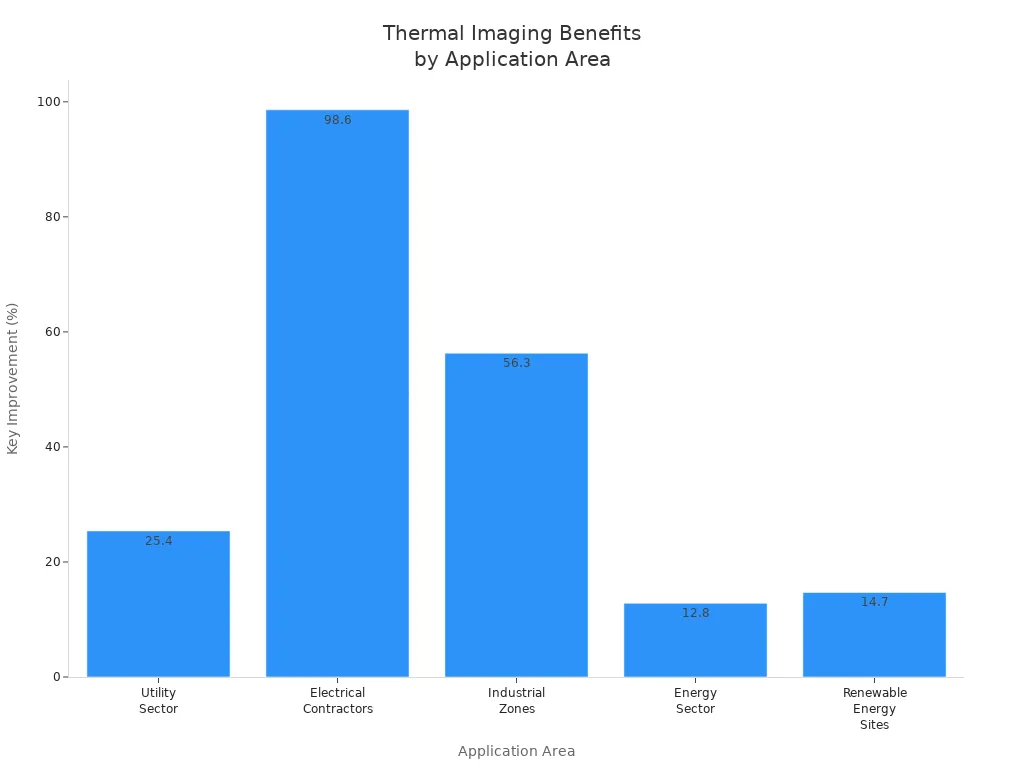
You can use advanced cameras to watch energy systems all the time and get more power from renewable sites. These benefits show why advanced users pick high-quality thermal imaging cameras for their work.
Note: When you pick a camera, match its features to your needs. Advanced models give you more control, better pictures, and help with hard jobs.
Choosing the Right Thermal Camera
Match Features to Needs
You need a thermal camera that matches your job. First, think about what you want to check. Different jobs need different features. For home checks, you might look for leaks or missing insulation. You may also check for hot wires. If you work with hvac systems, you need to see small temperature changes. Electrical checks need a camera that finds hot spots in circuits and fuses. Building checks often need a camera that can find insulation gaps and water leaks.
Here are some important features to match with your needs:
Finds heat to make clear temperature maps.
Has high temperature sensitivity to spot small changes, which helps with hvac systems.
Lets you check things without breaking walls or equipment.
Shows where heat is lost, so you can save energy.
Helps you keep machines working by finding problems early.
If you want to use your camera for more than one job, pick one with higher resolution and strong build. A wireless camera lets you reach small spaces and move around easily.
Tips for First-Time Buyers
Buying your first thermal camera can be tricky. These tips will help you choose well:
Think about what you will check most—home, electrical, or outside.
See if the camera works with your phone or device.
Pick at least 80×60 resolution for simple jobs, or 160×120 and higher for more detail.
Read app reviews to see if the software is easy and works well.
Choose wireless for more movement, or plug-in for simple use.
Look for a one-year warranty and good customer service.
Stay away from brands that do not share clear details or make big promises.
Many new users ask how to use a thermal camera for electrical checks, what features matter most, and why these cameras work well. Start with your main needs, and you will find a camera that makes checks easier and more correct.
There are lots of good thermal cameras you can pick. The Verytek IX2 AIR is special because it has a high 256×192 resolution. It also has a fast 25Hz refresh rate and no wires. If you own a home, you can use basic models to find air leaks or missing insulation. People who work as pros need cameras with higher resolution for hard jobs and close checks.
Resolution Range | ||
|---|---|---|
Entry-Level | 80×60–160×120 | Home checks, quick scans |
Professional | 192×192–384×288 | Detailed reports, tough jobs |
Look for things like clear images, strong build, and easy apps. The best camera helps you check your house faster and get better answers. 😊
FAQ
What resolution do I need for home or professional use?
Pick at least 160×120 resolution for home checks. For professional jobs, 256×192 gives you clearer pictures and more detail. Higher resolution helps you see small temperature changes. It also makes your reports more correct.
How does wireless thermal imaging help in tight spaces?
Wireless cameras let you use your phone away from the camera. You can reach into small or hard places. You do not have to deal with cords. This makes moving around easier and safer.
Why does refresh rate matter in thermal cameras?
A higher refresh rate, like 25Hz, shows moving things smoothly. You can see leaks or electrical problems as they happen. This helps you find problems fast and not miss anything important.
What makes a thermal camera durable for job sites?
You need a camera with an IP54 rating and drop resistance up to 2 meters. This keeps your camera safe from dust, water, and falls. Tough cameras last longer and work well in hard places.
Can I generate reports and analyze images on my phone?
Yes, many thermal cameras have apps. You can look at, study, and save thermal images on your phone. Some apps make reports for you, so your work is faster and more neat.
See Also
The Importance of Thermal Imaging Cameras in 2025
Utilizing Thermal Imaging Cameras for 2025 Search and Rescue
Vanadium Oxide Thermal Imaging Cameras for Effective Rescues